Configuring Cisco Cyber Vision Monitoring in Netwatch
Overview
Netwatch integrates with Cisco Cyber Vision using its REST API v3 and Bearer token authentication. Unlike other HTTP-based integrations, Cyber Vision does not use basic authentication. Instead, Netwatch queries the Cyber Vision Center using a static API token passed in the HTTP Authorization header.
This integration enables monitoring of OT asset inventory, security alerts, vulnerabilities, and system health from a centralized Netwatch dashboard.
What Netwatch Monitors in Cyber Vision
Netwatch can collect and monitor the following Cyber Vision data:
- Asset Inventory
- Discovered OT/ICS assets
- Asset type, vendor, and firmware details
- Security Alerts
- Active alerts and incidents
- Severity levels (critical, high, medium, low)
- Vulnerabilities
- Assets impacted by known vulnerabilities
- Risk exposure indicators
- System Health
- Cyber Vision Center availability
- API responsiveness
- Discovery
- Automatic discovery of assets and alert entities
Prerequisites
Before configuring Cyber Vision monitoring in Netwatch, ensure:
- Cisco Cyber Vision Center is deployed and reachable
- Cyber Vision REST API v3 is enabled
- A valid API Bearer token has been generated
- Network connectivity exists between Netwatch and Cyber Vision Center
- HTTPS (TCP 443) access is permitted
1. Generate Cisco Cyber Vision API Token
Cisco Cyber Vision uses token-based authentication.
- Log in to Cisco Cyber Vision Center.
- Navigate to Administration → API tokens.
- Generate a new API token with read permissions.
- Copy and securely store the token.
This token will be used by Netwatch as a Bearer token.
Cisco API reference: https://devnetapps.cisco.com/docs/cisco-cyber-vision/
2. Add Cyber Vision Host in Netwatch
- Navigate to Configuration → Hosts.
- Click Create Host.
- Configure the host:
- Host name: CyberVision-OT
- Host group: Security / OT Monitoring
- Agent interface: Cyber Vision Center IP or hostname
3. Configure Host Macros (Critical Step)
Cyber Vision authentication is handled entirely via macros.
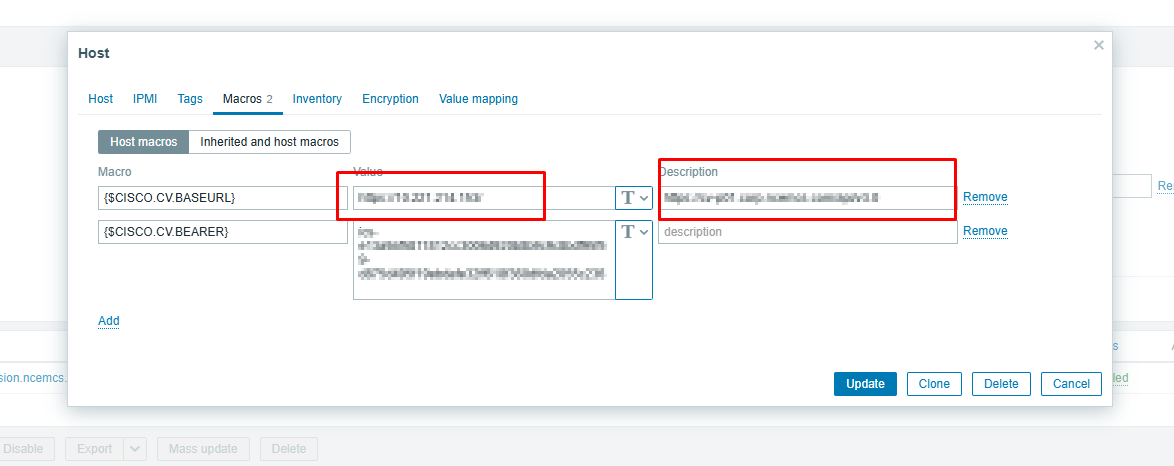
Go to the Macros tab and add the following host macros:
| Macro | Value | Description |
|---|---|---|
{$CISCO.CV.BASEURL} | https://<cybervision-ip>/ | Cyber Vision base URL |
{$CISCO.CV.BEARER} | <API_TOKEN> | Bearer token (Secret text) |
Important notes:
- The BASEURL must not include
/api/v3 /api/v3is appended internally by the Netwatch template- The Bearer token must be stored as Secret text
Example:
{$CISCO.CV.BASEURL}→https://172.XXX.XXX.XXX/{$CISCO.CV.BEARER}→ics-e13a9af5...
4. API Endpoint Usage (Reference)
Netwatch communicates with Cyber Vision using endpoints such as:
No username/password authentication is used.
5. Verify Data Collection
Within a few minutes:
- Navigate to Monitoring → Latest Data
- Select the Cyber Vision host
- Confirm availability of:
- Asset counts
- Active alerts by severity
- Vulnerability metrics
- API health checks
6. Cyber Vision Dashboards
Netwatch dashboards provide OT security visibility.
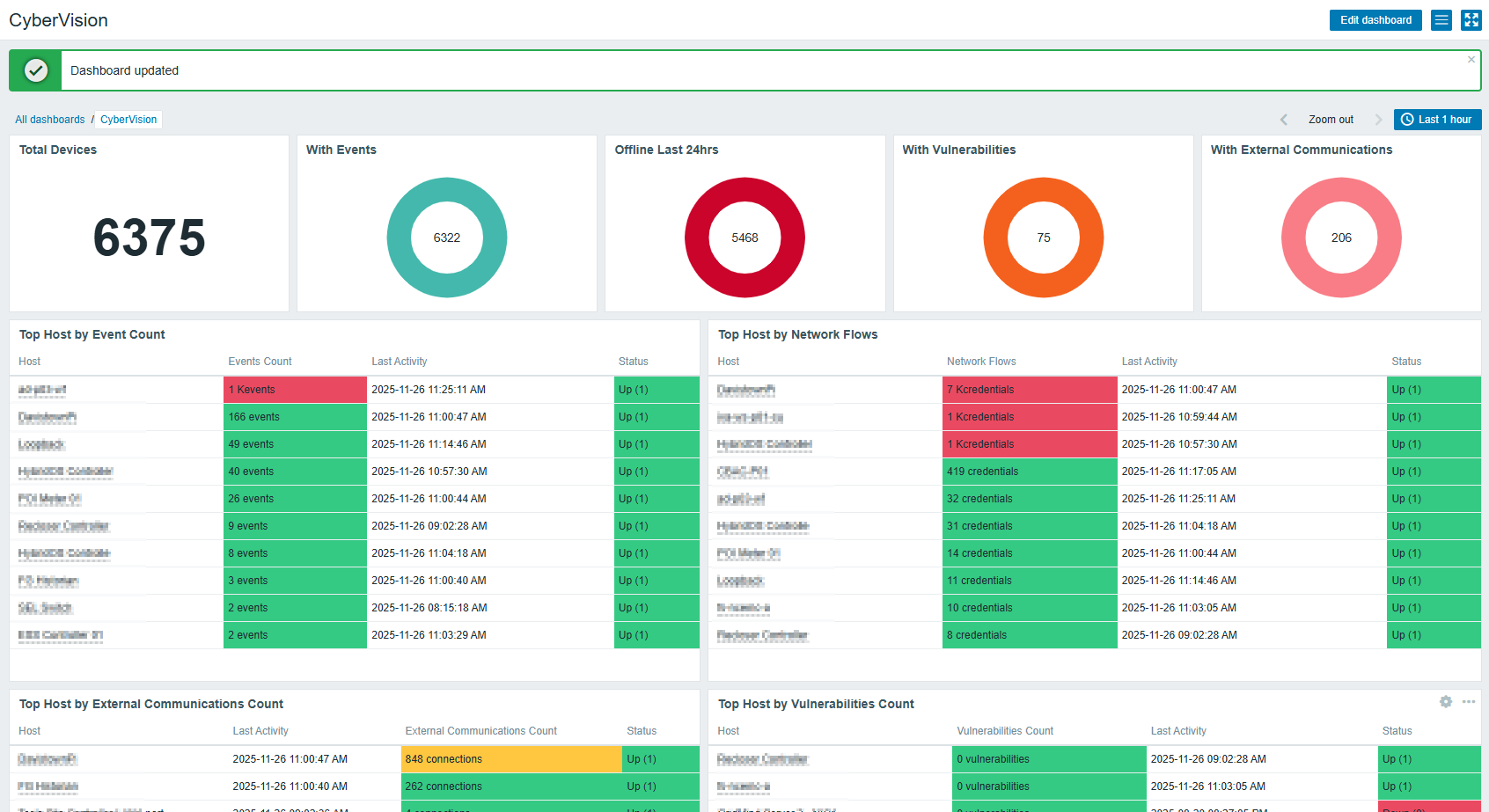
Dashboards include:
- Asset inventory overview
- Active security alerts
- Vulnerability exposure summary
- OT network security posture
Key Considerations
- Cyber Vision uses Bearer token authentication only
- Do not include
/api/v3in the base URL macro - Store API tokens securely using Secret Text macros
- Ensure certificates are trusted if using HTTPS