NetOPSConfiguration
FortiGate SNMP v3
Configure SNMP v3 on FortiGate and integrate it with Netwatch.
Overview
SNMP v3 provides enhanced security through authentication and encryption compared to SNMP v1 and v2c. In this guide, you will learn how to configure SNMP v3 on a FortiGate device and link it to Netwatch for monitoring.
Part 1: Create an SNMP v3 User in the FortiGate GUI
1. Access the SNMP Settings
- Log in to your FortiGate web GUI.
- Navigate to System > SNMP.
- Under SNMP v3, click Create New.
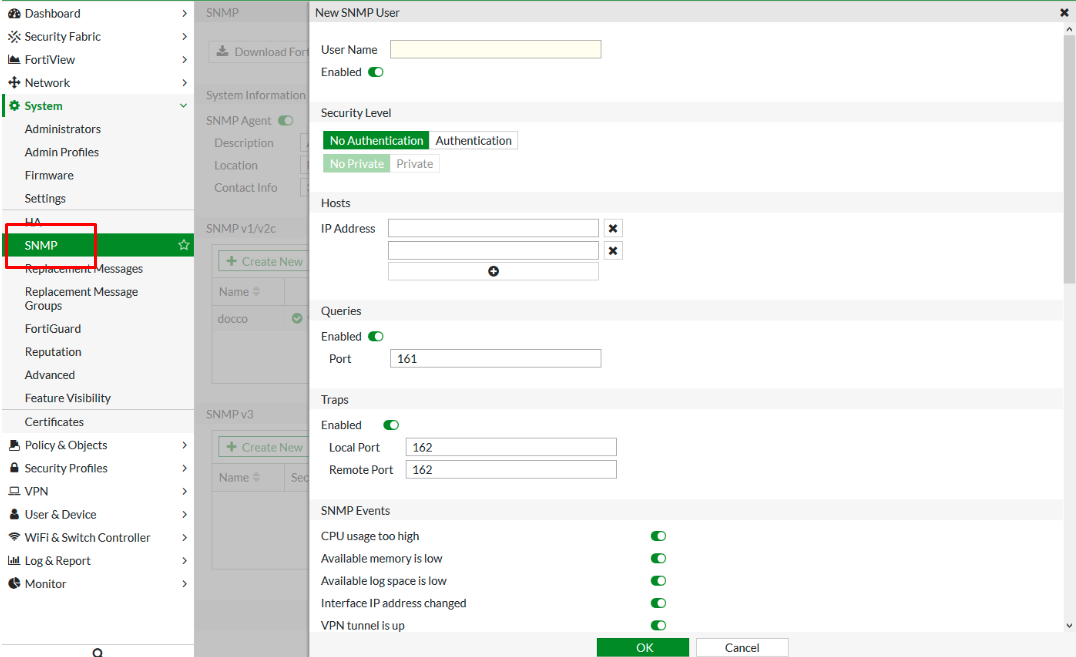
2. Create SNMP v3 User
For example, fill as follows:
| Field | Example Value |
|---|---|
| Username | netwatch |
| Security Level | Authentication and Private |
| Auth Protocol | SHA |
| Auth Password | AuthPass123! |
| Privacy Protocol | AES |
| Privacy Password | PrivPass456! |
- Remember, use your own secure credentials.
- Check Enable this SNMP User.
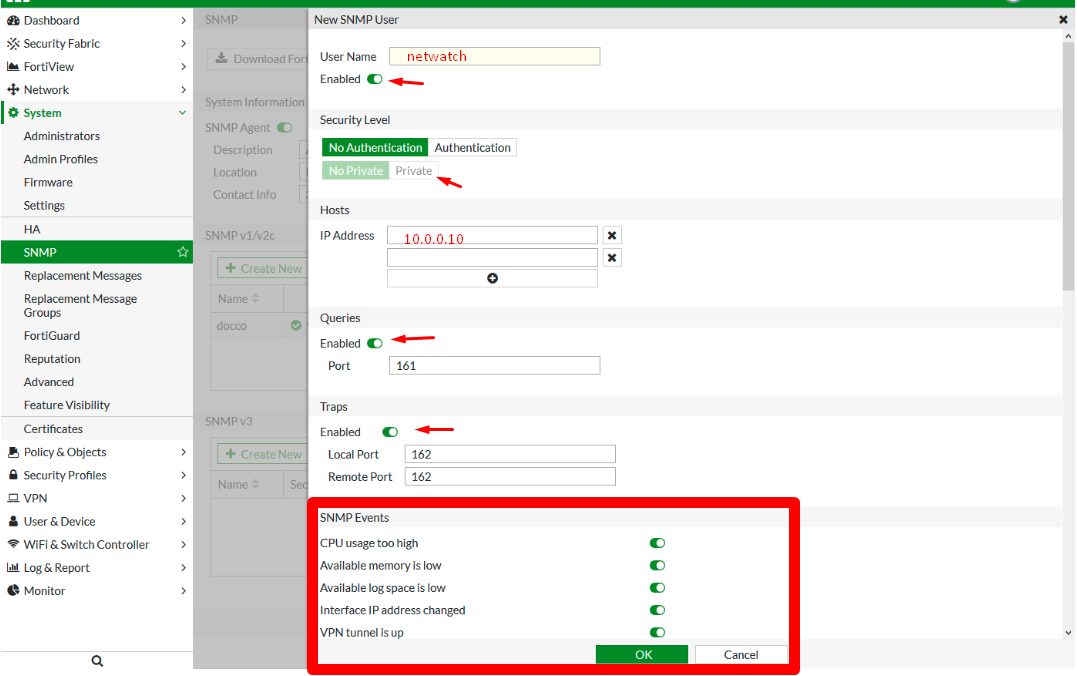
3. Configure Hosts and Traps
Example values:
| Field | Example Value |
|---|---|
| Notify Hosts | 10.0.0.10 |
| Query Port | 161 (default) |
| Trap Port | 162 (default) |
| Source IP | 192.168.1.1 (FortiGate) |
- In the Hosts section, specify the IP of the Netwatch server.
- In Queries and Traps, enter port numbers and toggle settings as needed.
- Under SNMP Events, enable events like
cpu-high,mem-low,log-full, etc. - Click OK.
Part 2: Create an SNMP v3 User via FortiGate CLI
You can also create the SNMP user from the CLI with this example:
config system snmp user
    edit "netwatch-snmpuser"
        set status enable
        set trap-status enable
        set trap-lport 162
        set trap-rport 162
        set queries enable
        set query-port 161
        set notify-hosts 10.0.0.10
        set source-ip 192.168.1.1
        set ha-direct disable
        set events cpu-high mem-low log-full
        set security-level auth-priv
        set auth-proto sha
        set auth-pwd AuthPass123!
        set priv-proto aes
        set priv-pwd PrivPass456!
    next
end
Part 3: Add FortiGate to Netwatch
-
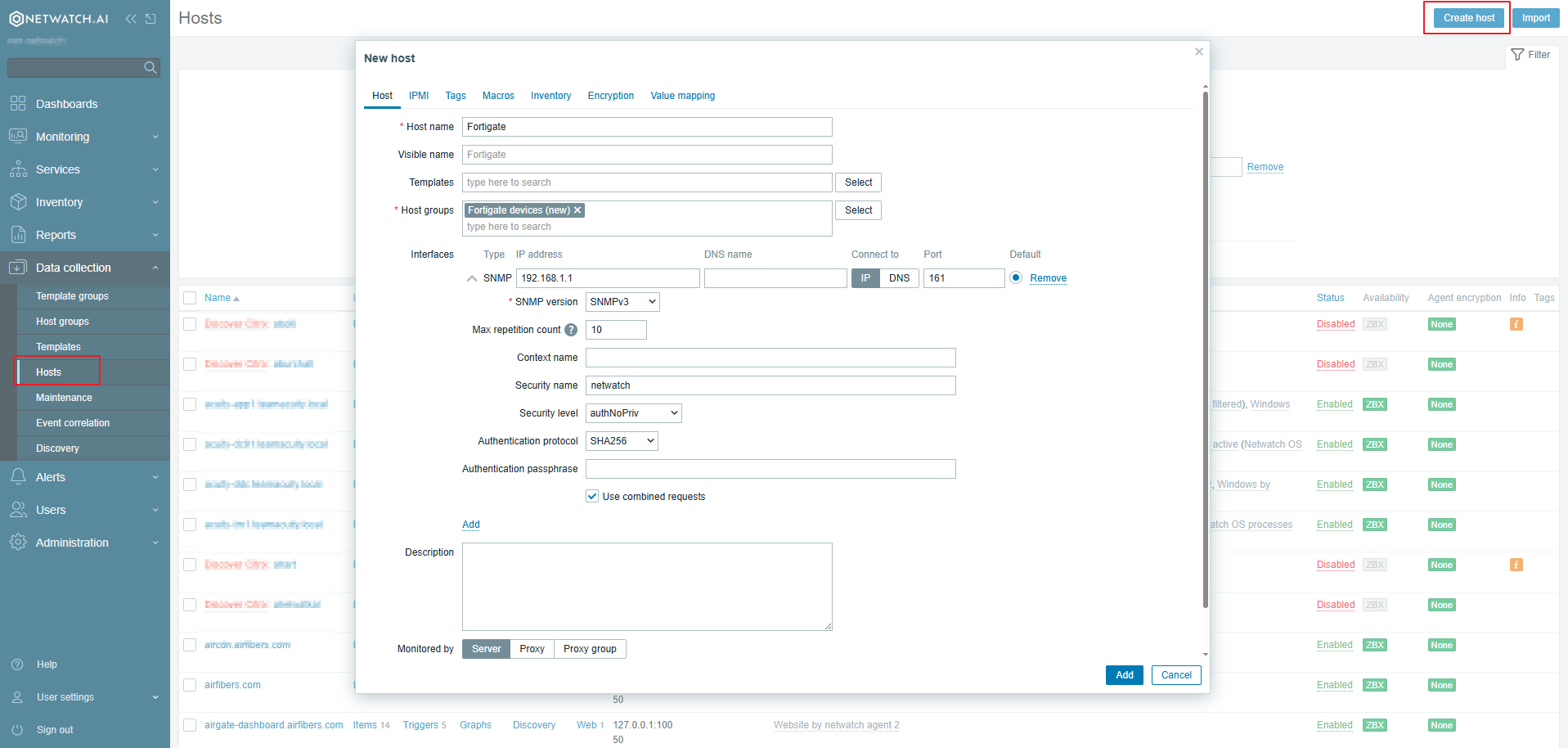
Navigate to Hosts
In Netwatch, go to Monitoring > Hosts.
Click Create Host. -
Host Setup
- Select Interface Type:
SNMP - Fill in the FortiGate IP address (e.g.,
192.168.1.1) - In Security Name, enter the username you created in FortiGate's SNMP v3 config (e.g.,
netwatch) - Choose:
- SNMP Version:
v3 - Authentication Protocol:
SHA - Authentication Password:
AuthPass123! - Privacy Protocol:
AES - Privacy Password:
PrivPass456!
- SNMP Version:
- Set Port:
161 - Assign a Host Group (e.g.,
FortiGate Devices)